What is a Fourier transform?
Every periodic function can be presented as a sum of harmonic functions. The Fourier transform (FT) breaks down the source function into sine functions of varying frequencies. Images located in the spatial domain are transformed into the frequency domain by the Fourier transform. The resulting image is called an FT image. The Fourier transform is a mathematical algorithm which changes the way an image is represented. Even though the source image and the FT image appear very different, they both contain the same image information.
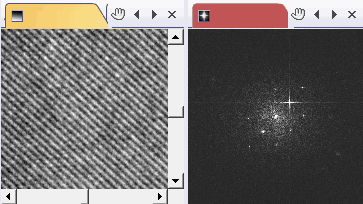
The image on the left displays a gold sample as viewed by a transmission electron microscope. The image shows periodic structures caused by the gold crystal lattice. On the right, you can see the FT image. Every point in the FT image represents a particular spatial frequency. If the source image has as defined periodic structures as in this example, then you can see spots in the FT image. The gold's lattice spacing determines the distance of the spots from the center of the FT image.
Uses for the Fourier transform
There are many uses for an FT. For example, special highpass and lowpass filters can be created. Pattern recognition algorithms and algorithms that determine correlations also use the FT, as a rule. Additionally, the convolution of two images can be calculated much faster by multiplying the two images in frequency domain.
You can use FT images as a tool to help you focus your sample on a transmission electron microscope. The wider the intensity distribution in the center of the FT image is, the more space frequencies can be seen in the image and the better focused the image is.
With the help of FT images, you can check the astigmatism correction of your transmission electron microscope very efficiently. An amorphous carbon foil shows a broad and diffuse ring in the FT image. This ring should be round. If the ring isn't round it means that the astigmatism isn't properly corrected.
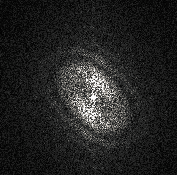
The intensity distribution in this FT image shows ellipses instead of rings. The astigmatism correction on the microscope needs to be checked.
Uses for the Fourier transform in your software
With your software, you can compute FT images from 16-bit gray-value images. The Fourier transform can also be used in the live-image. To do so, use, e.g., the Acquire > Live command to switch to the live mode. In live mode, use either the Image > Calculate Fourier Transform > FT on Full Image command or the FT on ROI command.
The Fourier Transform tool window gives you an overview of which FT images are currently loaded in your software and to which images they belong.
See also
Tool Window - Fourier Transform
00280 14032014