|
Use the Line Profile tool window to measure the intensity profile along a line on an image.
What can you use a line profile for?
Using the line profile on different image types
Measuring the line profile
See also
Tool Window - Line Profile
Line Profile Settings
What can you use a line profile for?
Use the line profile to measure the distance between structures, for example. Expand the line profile to compute the average intensity. This allows you to determine the distance between the lines precisely. You can find more information on this topic here.
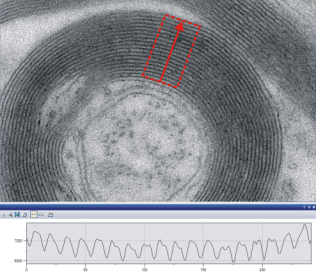
The illustration shows a line profile with an expanded measurement area which is used to measure the average intensity.
back to top
Using the line profile on different image types
 Line profile in the live-image Line profile in the live-image
You can also measure the line profile in the live-image. The line profile is only shown while the live mode is switched on. The line profile will be hidden as soon as you exit the live-image.
 Line profile on time stacks Line profile on time stacks
With image series, the line profile that is shown in the Line Profile tool window always applies to the frame that is currently on display in the image window.
That's to say, with a time stack, you will see the line profile for one frame that was acquired at a specific point in time.
Use the navigation bar in the image window to select the frames you want to see. The line profile will be continually updated.
back to top
Measuring the line profile
You cannot directly measure on the diagram that is part of the Line Profile tool window. If you want to measure distances in the line profile, create a chart document first.
1.On the current image, measure the line profile you are interested in. 2.In the Line Profile tool window, click the Export to Chart  button. button. •A new chart will be created in the document group. 3.Use the Measure > Horizontal Line... command to measure a distance, or several distances, in the line profile. •You can find the measurement results in the chart document or in the Measurement tool window. back to top
00460 08092014
| 