Use the Open filter to separate objects and to smooth the edges of objects. You'll find the filter in the Process > Morphological Filter menu.
See also
Overview - Morphological Filter
Working with morphological filters
Application
With the Open filter you can carry out the following tasks:
•You can separate objects that are connected by thin lines.
•You can even out unevenness on the edges.
•You can remove small objects that belong to the background noise.
Settings for the filter
Here you'll find information on how you can set the shape and size of the morphological filter.
The dialog box that is opened when you use an image processing operation is made up in the same way for every operation. Click here to switch to a description of this dialog box.
Exactly what happens?
This filter performs the Dilation and Erosion filter operations, one after the other. First the outer edge of the object is removed, noise and thin lines disappear. The object is then enlarged.
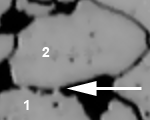
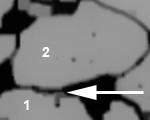
The illustration shows how the Open filter works for a 3x3 neighborhood with two iterations. On the left, you see the source image, and on the right, the resulting image. The objects (1) and (2) are separated after the filtering has taken place. The noise has been reduced.
Comparison with other filters
In contrast to plain Erosion filters, the object size is retained when an Open filter is applied.
1750 03122014