|
|
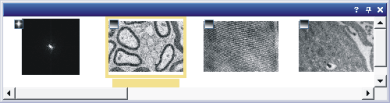
The Gallery tool window shows thumbnails of all the loaded documents, thus supplying you with a quick visual overview. Should this tool window not be visible, use the View > Tool Windows > Gallery command to show the tool window.
Context menus in the tool window Actions in the galleryActivating documentsDoubleclick the required document in the Gallery tool window. In this way you activate the corresponding document in the document group. You can then examine an image on your monitor. Sorting documents in the GalleryYou can arrange the documents in the gallery view by different criteria. To do this, rightclick in the background of the gallery, and select the Arrange by command, to open a submenu with the sort criteria that are possible. The active sort criterion will be indicated by a check. Changing the size of thumbnailsYou have the choice between two sizes of thumbnail. Rightclick in the background of the gallery, and select the Thumbnail Size command. Then select either the Small, Medium or Large entry. Saving, duplicating, closing imagesYou can also save, duplicate or close, every document from the gallery view. Select one or more documents and click the right mouse button. Select the command you want from the context menu. Context menus in the tool windowThe context menu can offer you different functions, depending on which, and how many, documents you select in this tool window. Context menu - backgroundTo open a context menu, right click a tool window's background. This menu contains commands that apply to all of the loaded documents or that change the tool window's appearance. Context menu - DocumentIf you select a specific document, the context menu will only offer you commands that apply to this document. You can, for example, save, close, or duplicate the selected document, or view its properties. Context menu - headerTo open a context menu, rightclick a tool window's header. The context menu contains, among other things, a list of all of the tool windows that are available. Use this list to make tool windows appear. 3100 08042013 |