What purpose do threshold values serve?
Several image processing functions require you to first specify intensity ranges or color ranges on an image. Examples of this are the conversion of an image into a binary image or automatic object analysis.
Example of setting threshold values for an automatic object analysis
For an automatic object analysis, you first have to define the objects. The software looks at the gray intensity value or the color of an object. An object is comprised of all the adjoining pixels whose intensity or color is within a certain range.
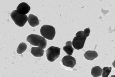
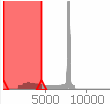
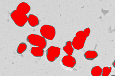
Image 1: You can see dark objects in the original image.
Image 2: The illustration show the image's histogram and the phases that have been defined. The histogram is displayed in the dialog box for setting threshold values.
Image 3: The thresholds have been set to include the objects within the same range. The phase is shown in red in the image.
Different threshold value methods
Depending on the image type and the preferred threshold value method, you will obtain slightly different dialog boxes for the threshold value setting.
Automatic threshold value for gray-value images
Automatic threshold values for RGB images
Manual threshold values for gray-value images
Manual threshold value for RGB images
Manual HSV threshold values for true-color images
5514 21112014