|
|
Use the Automatic Threshold Computation dialog box to automatically compute the thresholds for the current image. If necessary, you can edit these thresholds manually later. Prerequisite: Automatic thresholds are always computed from the intensity values in the current image. This also applies when you define thresholds on true-color images. Opening the dialog boxIn the dialog box for setting the threshold values, click the Compute Phase Thresholds Automatically See also Manual threshold values for gray-value images Manual HSV threshold values for true-color images Description of dialog boxIn the Count field, located in the Phases group, enter the number of phases that are to be calculated. In the Background group, you define whether the bright or the dark image structures, or alternatively the complete image, are to be used for the automatic analysis. The term background is used in this context for all of the image structures that are not within the threshold values. Select the Dark option if the dark image structures are to be used as background. In this case, bright image structures will be defined as a phase and will be evaluated in the automatic analysis. Select the Bright option if the bright image structures are to be used as background. Select the Automatic option if the classifying of the image structures as either phase or background, is to occur automatically. In this case your software evaluates the images histogram. Please note that the number of phases to be defined isn't automatically adjusted. The number of phases to be defined has to be set correctly so that the image structures can be correctly allocated to a phase. Select the None option if no image area is to be defined as background. In this case, the complete image will be evaluated when the automatic analysis is carried out.
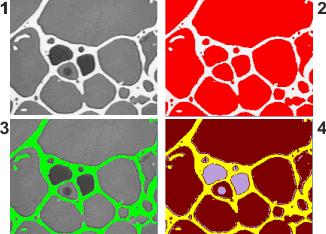
In image (1), you can see objects with three different gray intensity values. In image (2), the bright image structures are the background. The rest of the image is allocated to one single phase. The phase is colored red here. In image (3), the dark phases are defined as background. The bright phase is detected. In image (4) no background has been chosen, all image structures are defined as phases. In this case, three phases are defined. Computing thresholdsThe threshold values will be automatically calculated as soon as you've clicked OK. The minimum and maximum intensity values in the current image are determined. The thresholds are defined so that the minimum and/or maximum values belong to one phase. You can then still manually edit the threshold values. 5815 24112014 |