|
|
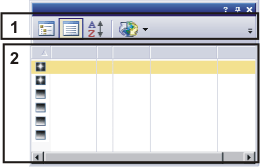
The Documents tool window provides you with an overview of all loaded documents. Use this tool window if you have opened a lot of documents and require a fast overview. Should this tool window not be visible, use the View > Tool Windows > Documents command to show the tool window. Makeup of the tool windowThe tool window is made up of several parts. Click on one of the areas in the tool window shown above to jump to the corresponding help topic. (2) Part of the tool window where the documents are displayed See also (1) The tool window's toolbarThere are several ways to display loaded documents in the tool window. To do this, use the tool window's buttons.
The following table lists the buttons which are available by default on the toolbar.
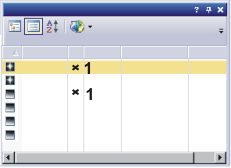
(2) Part of the tool window where the documents are displayedIn the part of the Documents tool window where the documents are displayed, you will find a list of all of the documents that are currently loaded. Unsaved documents
You can recognize a document that has not been saved or which has been changed by its missing file extension and by the little asterisk (1) behind the file's name. 3885 13032014 |