What is a drawing layer?
The drawing layer is used to display additional information in the form of labels, markers or drawings, on an image. As a rule, the drawing layer contains several drawing objects, out of which the complete drawing is put together. An arrow or a circle are examples of drawing objects.
Inserting drawing objects
The Drawing toolbar makes a variety of drawing functions (line, rectangle, ellipse, text) available to you, as well as options for color selection and line styles.
The two layers, image and drawing layer, are independent of each other
Onscreen, the image and the drawing layer are shown together. The data on each of them will, however, be stored separately in the TIF file format. Try and picture the drawing layer like a transparency which is placed over the image. You create the drawing on this transparency. When you create a drawing, the image itself will not be changed by it, only the drawing layer will be filled out. Furthermore, you can make the drawing layer disappear or delete it at any time. To do so, use the Layers tool window.
Note: The drawing layer will only be kept separately from the image if you save the image in TIF or VSI format. All other image file formats do not support such a drawing layer.
Displaying/fading out and deleting drawing layer
Use the Layers tool window to activate the different layers an image can have. In this tool window you see the drawing layer and the image as two thumbnails.
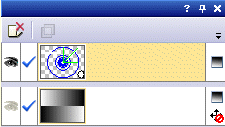
Click the eye icon  in front of the drawing layer to hide this layer. Now, click an empty cell without an eye icon, to make the corresponding drawing layer reappear.
To delete a drawing layer, you must first select it. To do this, just click on the thumbnail. The drawing layer will then be shown with a colored background in the tool window.
Then click the Delete Layer  button. In this manner you can remove all of the drawing objects in an image with one mouse click.
What, exactly, is a drawing layer?
An image will be stored in your computer's memory as a pixel graphic or a bitmap. The image’s height and width indicate its number of pixels and thus the amount of memory necessary to store the image. As opposed to that, drawings will be stored as a vector graphic to save space. So if you have added, e.g., a line to the drawing layer, all that will be saved are the line's starting point and end point, and its color. Of course, before it can be displayed on your monitor together with the image, the vector graphic will have been turned into a bitmap, however, the data stored in the memory for both the original image and the drawings will not be affected by this.
See also
00080 25032013