The Process menu offers numerous image processing functions, with which you can change an acquired image (e.g., increase the image contrast or the image sharpness).
Processing images
1.Load the image you want to process, or activate the image in the document group.
2.Please note that the Process menu will only be visible when an image is loaded and active in the document group.
2.Use one of the commands in the Process menu, e.g., Process > Enhancement > Adjust Intensity... .
3.The image processing dialog box will open. The image processing operation that is active will be shown in the dialog boxes header.
3.Click the small arrow next to the Preview  button to open a list of all of the preview functions. Select the Original and Preview entry.
4.This preview function displays the same image segment twice in the dialog box. The first one shown is the source image. The second is the image that results when the current parameters are used.
•Most of the image processing operations need one or two of the parameters that are shown in the Settings group.
4.Change the image processing operation's parameters. After every change that is made in a parameter, the operation will be immediately applied to the source image, and the resulting image will be shown in the preview window.
Click the Default button, to readopt the preset parameters in the Settings group, when the current parameter doesn't make sense to you.
5.When you have found the optimal parameters, click the OK button to have the active image processing operation applied to the image with the active parameters.
6.The image processing dialog box will closed.
7.Please note that the image processing operation changes the source image. No new image document will be created. You can, however use the Edit > Undo command to restore the source image.
8.The altered image will not be saved automatically. The fact that a change has to be saved will be indicated by an asterisk shown behind the image name in the document group.
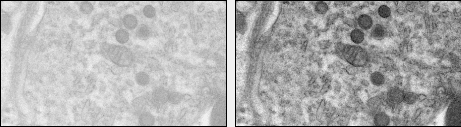
The source image (left) has low contrast. Adjust the intensity to get a resulting image with better contrast (right).
See also
00175 05032013