Use these functions to rotate or mirror drawing objects. You can find the functions, e.g., in the Draw > Rotate or Flip menu on the Drawing toolbar.
Before you use these commands, you need to select one or more objects. Please note that each object will be separately rotated or mirrored. Objects that have been grouped, are an exception to this rule, they will be rotated or mirrored as a complete group.
 The Rotate Left command turns all of the selected objects through 90° in a counterclockwise direction.
 The Rotate Right command turns all of the selected objects through 90° in a clockwise direction.
 The Horizontal Flip command mirrors all of the selected objects horizontally.
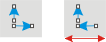
The illustration shows left, two arrows and right, the result after they have been mirrored.
 The Vertical Flip command mirrors all of the selected objects vertically.
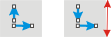
The illustration shows left, two arrows and right, the result after they have been mirrored.
See also
00086 26032013