Use the Image > Geometry > Mirror command to mirror the active image.
The dialog box that is opened when you use a geometry function is made up in the same way for every operation. Click here to switch to a description of this dialog box.
Note: Drawing objects or annotations in the source image will not also be mirrored.
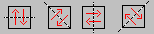
You can mirror the image along various axes. Simply select the option you want in the dialog box.
Characteristics of the resulting image
•The mirroring occurs without loss, i.e., all of the image's pixels will be retained, only their position changes. If you mirror twice along the same axis the source image will be restored.
•The image calibration will also be retained.
See also
1715 27022013