Gamma increases or lowers the image contrast as a function of a pixel's intensity I according to the following equation.

Where I = the intensity value of the destination image, and Io = the intensity value of the source image.
The values for Gamma vary between 0.01 and 10.
Values smaller than 1 let the image on the whole appear darker, but actually the image contrast will be increased in the brighter image segments.
Values greater than 1 let the image on the whole appear brighter, but actually the image contrast will be increased in the darker image segments.
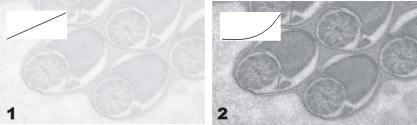
The illustration shows how the contrast enhancement works when the Gamma correction is used.
Image (1) shows the original image which means that the Gamma value equals 1.
Image (2) shows the image after a Gamma correction with a Gamma value of 0.3 has been performed. The image appears darker on the whole but has considerably more contrast.
The mapping function appears at the top left of each image.
See also
00047