What are HDR images?
Certain image modes (diffraction for example) can produce such strong differences in brightness that it is not possible to find an exposure time which is suitable for all parts of the sample.
For such samples, an HDR image acquisition is recommended. HDR stands for High Dynamic Range. Dynamic range relates to the capacity of cameras, or image processing software, to display both bright and dark image segments.
Before acquiring an HDR image, the necessary exposure range needs to be determined for the current sample. The exposure range is made up of a minimum and maximum exposure time as well as several exposure times between them. Several individual images are then taken of the sample with differing exposure times, so that no image segment is left over or underexposed.
Your software then detects the best exposed pixels in each acquired individual image and merges them into one new image. Under correctly defined acquisition conditions, the HDR image will no longer contain any under or overexposed image segments.
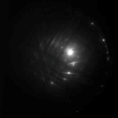
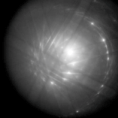
The first illustration shows a diffraction image of Silicon that was acquired without HDR. The second illustration shows the same diffraction image of Silicon, this time acquired with HDR.
Determining the exposure range
A recently determined exposure range will continue to be used for all HDR images until you let your software determine the exposure range anew. It is irrelevant whether the exposure range had been determined automatically or manually.
If you are acquiring several images of the same or similar parts of a sample, you don't need to determine the exposure range each time. If you change the sample or adjust settings on the microscope, it is recommended to determine the exposure range anew (either automatically or manually).
HDR images and movie recording
It is not possible to record movies with HDR. Because of this, the Activate HDR check box is ignored while the Movie recording check box is selected.
See also
07510 08092014